Watermarking Libraries: A Practical Guide
Watermarking Libraries: A Practical Guide
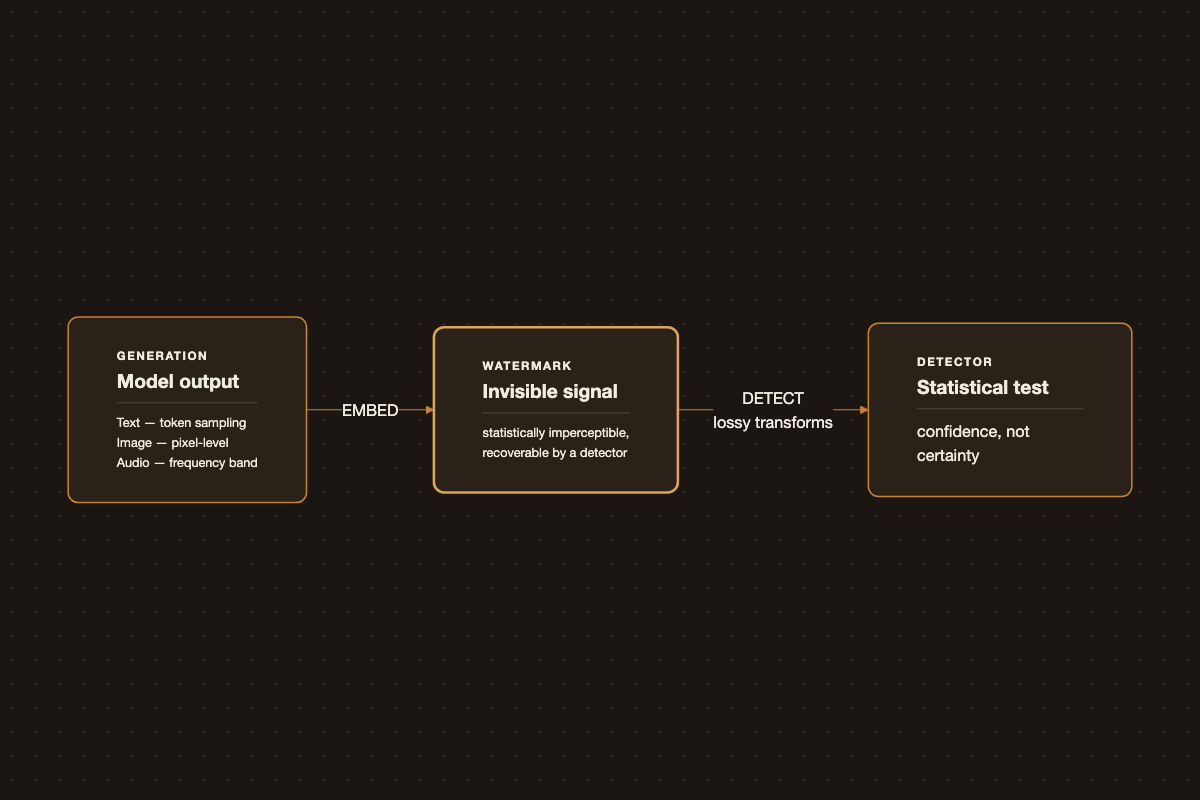
As generated text, images, and audio become harder to distinguish from human-made content, watermarking has become the default technical answer to “was this AI-generated?” The idea is simple - embed a signal at generation time that a detector can later recognize - but the mechanism differs a lot by modality, and the real design constraint isn’t embedding the signal, it’s making it survive. This post covers how each modality’s watermarking actually works, then which libraries implement it - with a closer look at text, since that’s the modality most people building on top of LLMs will touch.
Why Watermark at All
The motivating cases are provenance and misuse detection: labeling AI-generated content for platform policy, catching academic dishonesty, tracing deepfakes back to the model that made them, and giving downstream systems (search engines, content moderation, other models scraping training data) a way to know what they’re looking at. It’s a softer control than the input/output filtering in something like a guardrail stack - watermarking doesn’t stop generation, it labels what already happened.
Text Watermarking
Text is the hardest modality to watermark, because there’s no redundant channel to hide a signal in the way there is in pixels or audio samples - every token is visible, meaningful content.
The dominant approach (Kirchenbauer et al.’s green-red list scheme, and variants of it used in production systems) works at the logit level during sampling:
- Before sampling each token, use a hash of the preceding tokens to seed a pseudorandom split of the vocabulary into a “green” list and a “red” list.
- Bias the logits to favor green-list tokens - a soft boost, not a hard restriction, so output quality doesn’t visibly degrade.
- A detector with the same hashing scheme can count green-vs-red token ratios in a text sample and compute a statistical test: naturally-written text splits roughly 50/50, watermarked text skews green.
No embedded payload, no changes to model weights - it’s a sampling-time intervention, which is why it can be toggled per-request cheaply. The cost is a small, usually imperceptible shift in output distribution, and detection requires either the original hashing key or API access to a detector that has it. Google’s SynthID Text is a variant on the same idea.
Image and Video Watermarking
Images have more room to hide a signal, and the state of the art (Google DeepMind’s SynthID is the most deployed example) embeds it directly in pixel values in a way that’s statistically invisible to the human eye but recoverable by a matched detector - conceptually similar to spread-spectrum steganography, tuned to survive common transformations. Most practical libraries embed the signal in the frequency domain (DWT/DCT) or via a trained encoder/decoder network.
Video mostly reduces to per-frame image watermarking plus temporal consistency, so the signal doesn’t flicker or get exploited by frame-dropping.
| Library | Approach | Notes |
|---|---|---|
invisible-watermark (imwatermark) |
DWT-DCT and RivaGAN encoders | Used by Stability AI to tag Stable Diffusion outputs; the default choice if you just need “watermark this generated image” |
blind-watermark |
DWT-DCT-SVD, frequency domain | Pure Python, survives cropping/resizing reasonably well, good for document/photo watermarking outside of gen-AI pipelines |
| TrustMark (Adobe) | Learned encoder/decoder | Built for C2PA-aligned provenance workflows, more robust to common transforms than DWT-based methods |
| Pillow / OpenCV | Direct pixel overlay | Not a real watermark - just stamping a visible logo or text. Fine for branding, trivially removed, don’t use it for provenance |
Minimal invisible-watermark usage:
from imwatermark import WatermarkEncoder, WatermarkDecoder
import cv2

encoder = WatermarkEncoder()
encoder.set_watermark('bytes', b'my-signal')
img = cv2.imread('input.png')
watermarked = encoder.encode(img, 'dwtDct')
cv2.imwrite('output.png', watermarked)

decoder = WatermarkDecoder('bytes', 32)
watermark = decoder.decode(watermarked, 'dwtDct')
Audio Watermarking
Audio watermarks typically live in frequency bands outside normal perceptual sensitivity, or use phase manipulation that’s inaudible but detectable algorithmically. The added constraint versus images: the watermark has to survive lossy codecs (MP3, Opus) and analog-ish transformations like playback-and-rerecord, which is a much harsher channel than a PNG getting re-saved.
| Library | Approach | Notes |
|---|---|---|
| AudioSeal (Meta) | Neural, localized detection | Detects watermarked segments down to the sample level, fast enough for real-time use |
| WavMark | Neural, payload-carrying | Encodes up to 32 bits of payload per clip, robust to common re-encoding |
| audiowmark | Classical, frequency-domain | Open-source CLI tool, no Python dependency, robust to MP3 re-encoding |
The Real Problem: Robustness
Embedding a watermark is the easy 80%. The hard part is surviving the transformations content naturally goes through before anyone tries to detect it:
| Attack | What it does | Which modality it hurts most |
|---|---|---|
| Paraphrasing / back-translation | Rewrites text through another model, scrambling the green/red token pattern | Text |
| Cropping, resizing, compression | Destroys spatial statistics the watermark relies on | Image |
| Screenshot-and-recompress | Re-encodes the whole image, stripping pixel-level signal | Image |
| Regeneration attacks | Feed watermarked output back into a model (same or different) to strip the pattern while preserving meaning | Text, Image |
| Format conversion / re-recording | Passes audio through lossy codecs or a speaker-and-mic loop | Audio |
Text watermarks are the most fragile of the three, precisely because the channel carrying the signal (token choice) is also the entire content - there’s no redundancy to sacrifice. A few sentences of paraphrasing can knock detection confidence down substantially. Image and audio watermarks tend to be more robust because they exploit genuinely redundant channels (pixel-level noise, inaudible frequency bands), but aggressive enough transformation still degrades them.
This is also why watermarking is a detection aid, not a security control: it’s meant to catch casual and accidental cases, not resist an adversary specifically trying to strip it. Treating it as a substitute for content moderation or authentication is the most common design mistake.
Provenance Standards: C2PA
Separately from statistical watermarking, the C2PA standard (backed by Adobe, Microsoft, OpenAI, and others) takes a metadata-and-signing approach: a cryptographically signed manifest travels with the file, recording generation tool, edit history, and a content hash. It’s not hidden in the pixels - it’s an explicit, verifiable chain of custody, closer to a digital signature than a watermark.
The two approaches are complementary rather than competing: C2PA metadata is strong when it survives (cryptographically verifiable, tamper-evident) but trivially stripped by re-saving a file without preserving metadata. Statistical watermarking survives common re-encoding but only gives a probabilistic answer. A system that cares about provenance uses both - C2PA for the strong claim when metadata is intact, watermark detection as the fallback when it isn’t.
Text Watermarking: The Practical Focus
Text is where most people actually need this today - labeling LLM output - and it’s also the modality with the least redundancy to hide a signal in, so the tooling matters more.
Built into Hugging Face transformers
The lowest-friction option: no separate package, just a config object passed to generate(). transformers ships two schemes:
WatermarkingConfig- the Kirchenbauer et al. green/red list scheme, tunable viabiasandseeding_scheme.SynthIDTextWatermarkingConfig- Google DeepMind’s SynthID Text, open-sourced and merged upstream.
from transformers import (
    AutoModelForCausalLM,
    AutoTokenizer,
    SynthIDTextWatermarkingConfig,
)

tokenizer = AutoTokenizer.from_pretrained("repo/id")
model = AutoModelForCausalLM.from_pretrained("repo/id")

watermarking_config = SynthIDTextWatermarkingConfig(
    keys=[654, 400, 836, 123, 340, 443, 597, 160, 57],  # 20-30 random keys in practice
    ngram_len=5,  # 5 is a reasonable default, minimum is 2
)

inputs = tokenizer(["Explain how invisible watermarking works."], return_tensors="pt")
output = model.generate(**inputs, watermarking_config=watermarking_config, do_sample=True)
print(tokenizer.batch_decode(output, skip_special_tokens=True))
This is the right starting point if you’re generating text with a model you already load through transformers and just want detectable output with minimal integration work.
lm-watermarking (the reference implementation)
jwkirchenbauer/lm-watermarking is the original research implementation of the green/red list scheme, exposed as a LogitsProcessor you drop into generation, plus a matching detector. It exposes more knobs than the transformers built-in (gamma - green list size, delta - logit bias strength, seeding_scheme - how the list is derived), which makes it the better pick when you’re tuning the detectability/quality trade-off yourself rather than taking the defaults.
from extended_watermark_processor import WatermarkLogitsProcessor, WatermarkDetector
from transformers import LogitsProcessorList

watermark_processor = WatermarkLogitsProcessor(
    vocab=list(tokenizer.get_vocab().values()),
    gamma=0.25,
    delta=2.0,
    seeding_scheme="selfhash",
)
output = model.generate(
    **inputs, logits_processor=LogitsProcessorList([watermark_processor])
)

detector = WatermarkDetector(
    vocab=list(tokenizer.get_vocab().values()),
    gamma=0.25,
    seeding_scheme="selfhash",
    device=model.device,
    tokenizer=tokenizer,
)
result = detector.detect(tokenizer.decode(output[0]))
MarkLLM (compare schemes without committing to one)
THU-BPM/MarkLLM is a unified toolkit bundling roughly ten watermarking algorithms - KGW, a SynthID reimplementation, Unigram, EXP, SIR, and others - behind one API, with built-in detection and visualization. Reach for this when you’re evaluating which scheme fits your use case rather than shipping one from day one; it’s the tool for running an apples-to-apples comparison before committing.
Unigram-Watermark
XuandongZhao/Unigram-Watermark fixes the green/red partition instead of reseeding it per n-gram. Detection is more consistent across short generations, at the cost of being an easier pattern to reverse-engineer if an attacker sees enough samples from the same model.
Which One to Reach For
| Library | Best for | Effort |
|---|---|---|
transformers built-in |
Shipping quickly on a model you already serve via transformers |
Lowest |
lm-watermarking |
Tuning the quality/detectability trade-off yourself | Medium |
MarkLLM |
Comparing multiple schemes before choosing one | Medium |
Unigram-Watermark |
Short-generation use cases needing consistent detection | Low |
Where This Actually Bites
The gap that trips up most watermarking deployments - and every library above inherits it - is treating detection confidence as binary. Watermark detectors return a statistical score, not a yes/no - a short text sample or a heavily cropped image will produce a weak signal even from genuinely watermarked content, and reporting that as a hard “AI-generated: false” is the wrong conclusion. Picking a library solves the integration problem, not the robustness one: a paraphrase or regeneration pass can still knock detection confidence down substantially. If you’re building on top of watermark detection (content moderation, provenance UI, academic integrity tooling), surface the confidence level and the attack surface it’s vulnerable to, not just a pass/fail badge.